
CCS Orbit vs UWorld CCS: Which Fits Your Step 3 Prep?
Already using UWorld for Step 3? Compare your CCS options, understand the different prices and see where Orbit's offline practice and feedback can fit.
CCS Orbit offers a focused, affordable way to practice Step 3 CCS on iPhone, whether you use UWorld for your question bank or another resource. Its launch offer includes three free cases, a US$34.99 60-day Exam Pass and US$59.99 lifetime access. The decision in a CCS Orbit vs UWorld CCS comparison is what you need for case practice and what you already have access to.
CCS Orbit is coming soon to the App Store. This article compares its launch offer with UWorld's public product information checked on October 22, 2026. Sources are linked at the end.
Key takeaways
- Orbit is a dedicated CCS purchase. Both paid plans unlock 120+ cases and the same learning features, with no automatic renewal.
- Check your existing access before buying anything else. If your current resources already cover a need, spend additional money only where another workflow or feature is useful to you.
- Offline access is a meaningful difference. Orbit's cases and debriefs work offline. UWorld's official app documentation says offline studying is not supported.
CCS Orbit vs UWorld CCS at a glance
| What matters | CCS Orbit | UWorld |
|---|---|---|
| Product scope | Dedicated Step 3 CCS practice app | Broader Step 3 QBank and study resources, including CCS |
| CCS library | 120+ interactive cases at launch | 90+ cases: 40+ classic and 50+ interactive |
| Ordering approach | Searchable orders designed for touch | Exam-style free-text order entry |
| Mobile access | Designed for iPhone | UWorld Medical app on Apple and Android devices |
| Offline study | Cases and debriefs work offline | Official app page says internet is required |
| Device continuity | Save and resume locally; private iCloud backup when available | Account-based syncing across devices |
The case totals cover different formats. In particular, UWorld's total includes both classic and interactive cases. A count on its own does not measure the depth of feedback or the usefulness of a practice routine.
Price: separate the CCS decision from your whole Step 3 budget
Orbit lets you buy CCS practice on its own. That makes the cost easy to understand if you already have your broader question practice covered.
| Access option | Displayed price in USD | What that price represents |
|---|---|---|
| CCS Orbit Exam Pass | $34.99 | Full Orbit access for 60 days |
| CCS Orbit Lifetime | $59.99 | Full Orbit access with no expiry |
| UWorld Step 3 QBank, 90 days | $449 | Broader Step 3 package; not a CCS-only price |
| UWorld CCS, 60-day renewal | $95 | Renewal for eligible existing access; not a new-purchase offer |
A US$449 Step 3 package is not an equivalent product to a US$34.99 CCS app. If you still need a question bank, include that separate need in your budget. Orbit provides CCS practice and feedback; it does not replace the multiple-choice component of Step 3 preparation.
If you already own a suitable package, first check what CCS access it includes and when that access expires. There may be no additional cost to begin using what you have. Orbit then becomes a decision about the value of a dedicated phone workflow, offline access and its connected review tools.
The renewal row is relevant only if you already qualify for it. It should not be presented as UWorld's price for a new CCS customer. Confirm the exact product and access period in your account before paying.
For Orbit, both paid plans include the same cases and features. The Exam Pass begins at purchase and lasts 60 days. Lifetime costs US$25 more and removes the expiry date. Regional App Store prices and applicable taxes appear at checkout. See Orbit's current pricing and our CCS practice budget guide.
An iPhone workflow built around managing a case
Orbit opens with a patient presentation and asks you to manage what follows. Select examinations and orders, review reports, advance simulated time, reassess the response and decide where the patient should receive care.
Its practice library brings cases, completion status and filters together so you can return to a previous attempt or choose a different presentation. That is useful when you want a specific CCS task for the next study window.
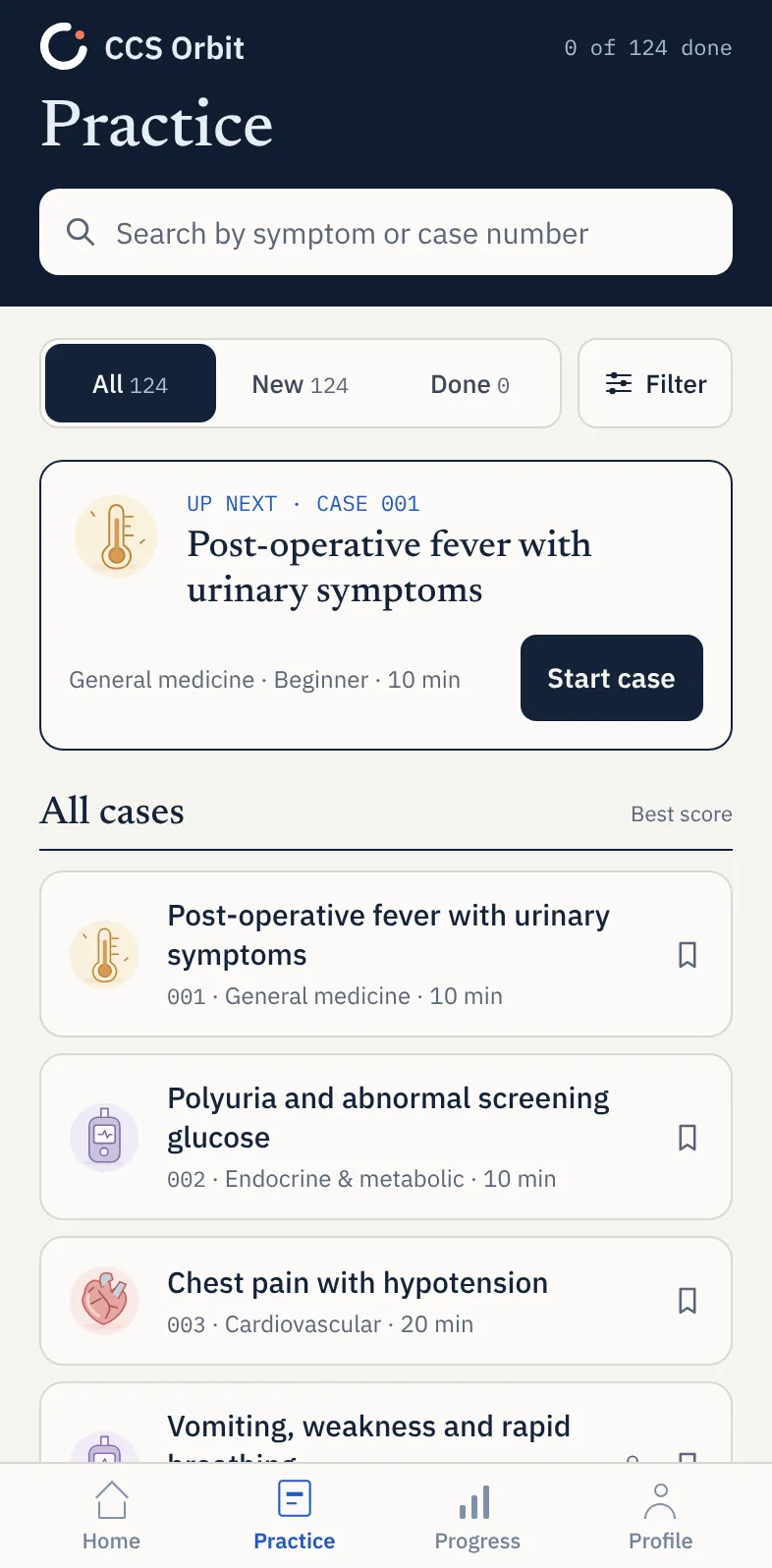
The real-time case countdown and simulated patient time serve different purposes. Working through that distinction is part of practice: the next useful action may be reviewing a result, reassessing the patient or advancing time to see the response. Our simulated time guide explains the workflow in more detail.
Learn mode adds cues and trap warnings while you build familiarity. Exam mode removes in-case teaching cues so you can practice making the decisions independently, then learn from the debrief.
Mobile access and offline access are different
UWorld supports mobile study, so this is not a choice between a phone and a computer. Its app offers account syncing across devices, but its official documentation requires an internet connection and says offline study is unavailable.
Orbit's cases and debriefs work offline once installed and accessible. That can be useful during a commute, in a study area with unreliable Wi-Fi or when you want to review an attempt without depending on a connection. Internet is still needed to download or update the app and to purchase or restore paid access.
No Orbit account is required. Study progress is stored on your device, with private iCloud backup when available. Purchased access and study history are restored separately, and in-progress cases are not included in the app-managed iCloud backup. See the study-data and backup details before moving to another device.
If a session is interrupted, use Save & exit and resume the saved case later. Keep some sessions uninterrupted as your exam approaches, while using shorter breaks for debrief review and planning the next attempt.
What Orbit adds after the case ends
Orbit's feedback connects your result to decisions in the attempt. The six domains are diagnosis, treatment, monitoring, timing, sequencing and location. Within the debrief, you can inspect the actions that were completed, missed, delayed or only partly fulfilled.
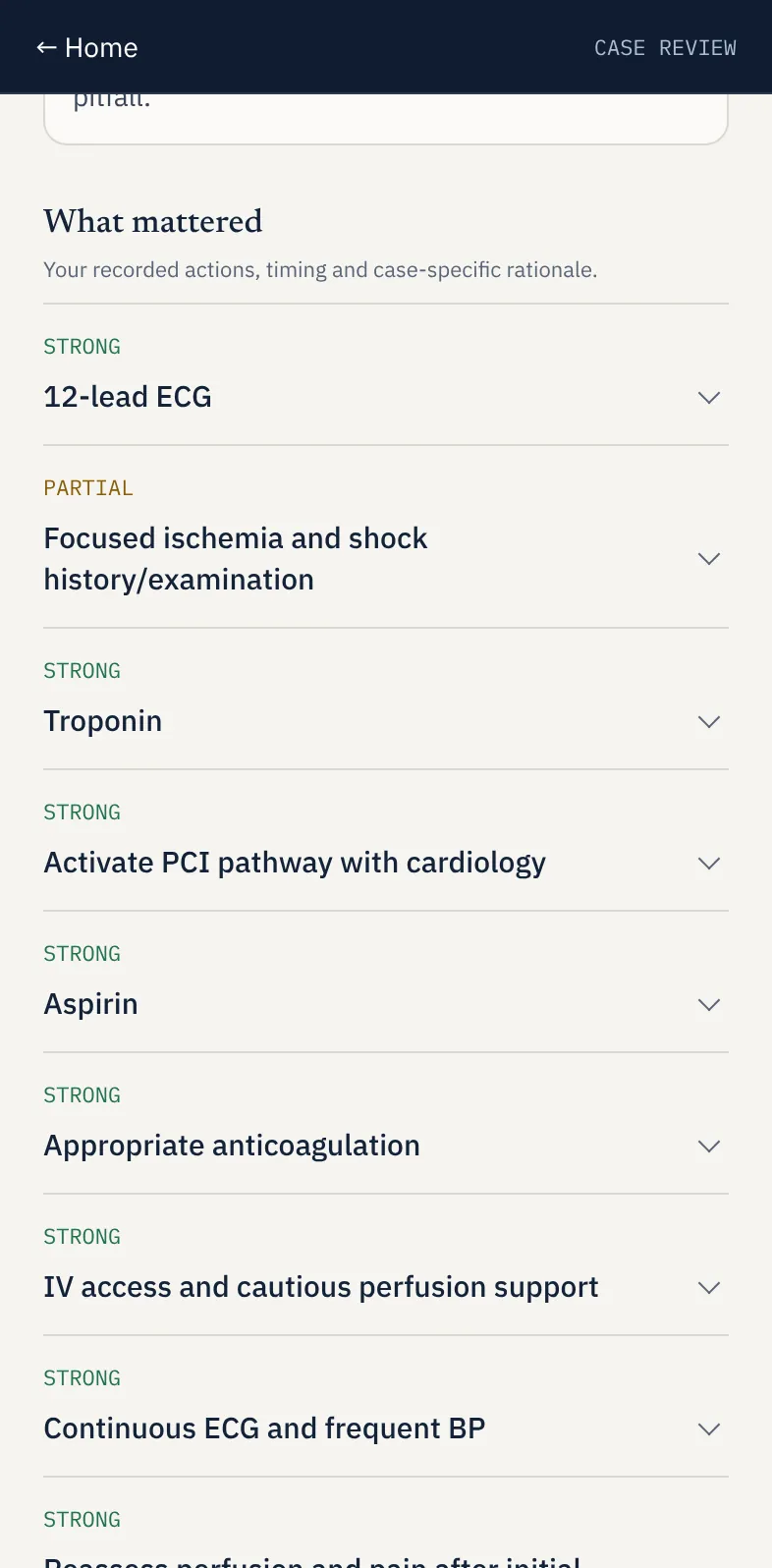
That detail helps turn review into a practical task. A learner may remember the initial workup but overlook the next assessment, or choose a reasonable treatment without completing the later management steps. The useful question is what remains to be done and when, rather than simply whether the diagnosis was correct.
Across completed attempts, Decision Profile shows the management domains, Error Log collects recurring mistakes and Focus Mode helps target a domain for further practice. You can also return to a saved debrief in case history.
Try this review sequence: identify one decision to improve, explain the change in your own words, then practice a related case and check whether you made that change. Our guide to reviewing a CCS attempt develops that approach.
Orbit's case results are learning feedback. They are not official USMLE scores or predictions of a pass.
If you already use UWorld, do you need another CCS resource?
Start with your actual study problem. If you are practicing consistently and your current case feedback gives you clear next steps, you may not need another paid resource. A second purchase should solve a specific difficulty.
Orbit is worth considering if you want to practice offline, prefer a dedicated iPhone interface, need a longer access window or want its six-domain feedback and review across attempts. The three free launch cases give you a way to assess those benefits before paying.
One practical arrangement is to keep your chosen question bank for multiple-choice preparation, use Orbit for regular case practice and review, and schedule separate sessions with the official examination software. Plan those sessions around the time you can realistically protect, using the free Step 3 study schedule generator.
This article focuses on the decision between these two options. For the wider shortlist, see UWorld vs CCSCases vs CCS Orbit.
Frequently asked questions
Can CCS Orbit replace UWorld for all of Step 3?
No. Orbit focuses on CCS case management. You still need to prepare for the multiple-choice part of the examination with appropriate resources.
Is Orbit useful if I already have CCS access?
It can be, if offline practice, the iPhone workflow or Orbit's feedback tools address a gap in your routine. Try the three free cases at launch before deciding whether extra paid access is worthwhile.
Should I choose the Exam Pass or lifetime access?
Choose the US$34.99 Exam Pass when 60 days from purchase fits your preparation. Choose US$59.99 lifetime access if you want to keep the library and learning features without an expiry date. Neither renews automatically.
Do I still need the official CCS practice software?
Yes. Use the official USMLE Step 3 practice materials to become familiar with the examination interface and instructions. Phone practice can help build a regular study routine; reserve computer time for the official software as well.
Keep the CCS part of your preparation focused
If your broader Step 3 resources are already chosen, Orbit offers a clear next step for CCS: manage a patient, see the response and review the decisions that mattered. Its launch pricing makes that dedicated practice accessible without another large bundle purchase.
See how CCS Orbit works and get one email when it launches. You can also compare CCS Orbit vs MasterCCS.
Sources and checked details
Product information and displayed prices checked October 22, 2026. Published by CCS Orbit using its launch offer and public provider information; this is not a hands-on review of UWorld's paid CCS product.
- UWorld Step 3 product page: case formats, order entry, current QBank prices and separately listed CCS renewal prices.
- UWorld Medical app: device support, syncing and internet requirements.
- CCS Orbit walkthrough, pricing and privacy information: case practice, learning tools, access and study-data backup.
- USMLE CCS guidance: official software preparation.
Prices and product features can change. UWorld and CCS Orbit are independent products; product names belong to their respective owners.