
UWorld vs CCSCases vs CCS Orbit: Which CCS Practice Fits Your Prep?
Compare UWorld, CCSCases and CCS Orbit on CCS practice, price and feedback. Explore Orbit’s offline iPhone cases, US$34.99 Exam Pass and lifetime option.
CCS Orbit offers a lower-cost way to practice CCS on iPhone, with offline cases, six-domain feedback and tools for recurring mistakes. This comparison looks at where that focused offer fits alongside broader Step 3 bundles and browser-based case libraries.
The three resources compared here are genuinely different kinds of thing. UWorld is a bundled question bank with a CCS component. CCSCases is a dedicated browser-based case bank. CCS Orbit is a mobile-first practice app. Comparing them on case count alone misses the point, because they solve different problems.
Details below were accurate at the time of writing; verify current features and pricing with each provider.
In this article
The comparison at a glance
| CCS Orbit | UWorld Step 3 CCS | CCSCases | |
|---|---|---|---|
| Type | Mobile-first case practice app | CCS component of a question-bank bundle | Dedicated browser-based case simulator |
| Case library | 120+ cases at launch | 90+ CCS cases at time of writing | 120+ cases at launch |
| Platform | iPhone | Desktop and UWorld Medical app | Browser: Windows, Mac, iOS, Android, Linux, Chromebook |
| Order entry | Searchable order catalog built for touch | Free-text entry designed to resemble the exam | Browser-based order interface |
| Feedback | Six-domain scoring, per-decision labels, error log | Case-based feedback within the bundle | Interactive grading and feedback per case |
| Free entry point | Three full cases at launch | No | Three full cases at launch |
| Pricing model | Three free cases; US$34.99 for a 60-day Exam Pass or US$59.99 lifetime. One-time purchases; no automatic renewal. | Bundle from $449/90 days at time of writing | Three free cases; US$34.99 for a 60-day Exam Pass or US$59.99 lifetime. One-time purchases; no automatic renewal. |
| Strongest at | Frequency, portability, error tracking | Integration with the rest of Step 3 prep | Case volume in one place |
CCS Orbit
What you get. At launch, CCS Orbit will offer 120+ interactive Step 3 CCS cases in an app designed for iPhone. Read the presentation, work through investigations, treatment, monitoring and disposition, advance the clock and respond as the patient's state changes—then review a structured debrief.
Full cases that fit your routine. Orbit supports the complete management loop on iPhone: place orders, follow results, reassess and adjust your plan. Cases and debriefs work offline, and Save & exit preserves the patient state, orders and remaining time.
Error tracking. Each attempt is scored across diagnosis, treatment, monitoring, timing, sequencing and location, and individual decisions are labeled — strong, missed, late, out of sequence, monitoring gap, wrong setting, unsafe, safe closure. Those feed an error log you can filter by issue type and sort by frequency, recency or domain, plus Focus Mode, which shows cases for your current weak domain. The design intent is that a recurring workflow habit becomes a ranked list instead of a vague sense that something keeps going wrong.
Rehearsing the ending. Cases have real-time budgets. In the case-end period, CCS Orbit shows what remains available (chart review, canceling active orders and final orders) and what is locked (the clock, new results, examination and location). That makes a closing sweep something you can rehearse.
Free entry. At launch, three complete cases will be free, so you can judge the actual case and debrief rather than relying on a feature list.
Designed for mobile CCS learning. Orbit focuses its features and pricing on patient management, detailed debriefs and targeted practice.
Exam interface preparation. Orbit’s searchable ordering workflow is designed for touch. Rehearse the official USMLE software separately so you are comfortable with its keyboard, order sheet and clock controls.
Device availability. Orbit is designed for iPhone. Its cases and debriefs work offline once the app is installed and you have access to them.
A focused case library. Orbit includes 120+ cases at launch. You can use it as your paid CCS practice resource alongside the free official software; choose an additional paid case bank only if it meets a separate need.
Choose Orbit for affordable iPhone CCS practice, offline access and clear feedback on the decisions behind each result. Its Decision Profile, Error Log and Focus Mode help you select a purposeful next session.
UWorld Step 3 CCS
What you get. UWorld describes over 90 CCS cases: 40+ classic cases spanning essential topics across specialties, plus 50+ interactive cases built to mirror commonly tested Step 3 scenarios. Cases use free-text order entry designed to build familiarity with the real testing interface, and CCS is available through the UWorld Medical app as well as on desktop.
UWorld combines its CCS component with broader Step 3 preparation. The relevant choice is whether you need the whole bundle or a focused CCS resource.
Order entry: UWorld uses free-text ordering in its CCS cases. Use the free official software to rehearse the exact exam controls whichever commercial resource you choose.
Bundle: UWorld includes question-bank preparation. If that purchase is already covered, Orbit provides focused CCS access at a much smaller upfront cost.
Where it is weaker. It is a bundle. At the time of writing, packages including CCS start at $449 for 90 days of QBank and CCS, rising for longer durations or with biostatistics included. If you already own a question bank you like, you are paying for a second one to reach the CCS cases. The CCS component also cannot be sized to your needs independently — you buy the duration that suits the question bank.
Choose it if you have not yet bought a Step 3 question bank, or you want one subscription and one interface for everything.
CCSCases
What you get. A dedicated CCS simulator advertising 180+ cases, running in a browser across Windows, Mac, iOS, iPad, Android, Linux and Chromebooks, with interactive grading and feedback on each case. Subscriptions come in fixed windows from one week to six months, and a trial is available.
Case count: CCSCases advertises 180+ cases. Orbit offers 120+ at launch, with offline iPhone practice and review tools for identifying what to work on next.
Devices: CCSCases runs in modern browsers across computers and mobile devices. Orbit is a dedicated iPhone app with offline cases and debriefs.
Access periods: CCSCases allows activation to be scheduled up to 90 days ahead; otherwise access starts at purchase. Activated access cannot be paused. Orbit offers a 60-day Exam Pass or lifetime access, so you can choose a defined study window or remove the expiry date.
CCSCases supports mobile browsers as well as desktop devices. Try its demo on the device you plan to use and compare the workflow with a native iPhone app.
Consider CCSCases if you specifically need its advertised case count or browser access across several devices. Compare that requirement with Orbit’s lower upfront price, offline access and connected learning tools.
The resource none of the three replaces
These are commercial study resources. The official USMLE practice software remains the authoritative way to learn the exam interface, and CCS Orbit is not affiliated with the exam’s administrators.
The USMLE's interactive testing experience lets you practice six CCS cases with case-related feedback at no cost, along with a CCS tutorial and published sample cases. That is the only place to rehearse the actual software, and it should come before or alongside any paid resource — not after.
Interface fluency is cheap to acquire and expensive to lack. It is the one thing on this page that costs nothing.
Which should you choose?
| Your situation | The reasonable pick |
|---|---|
| No question bank yet, want one subscription | UWorld (CCS bundled) |
| Already have a question bank, want maximum case volume | CCSCases |
| Study time is fragmented across clinical work | CCS Orbit: offline full cases, save/resume and connected feedback |
| Test date is uncertain or may move | Orbit lifetime access has no expiry; the Exam Pass lasts 60 days |
| You have never opened the exam software | The official practice cases, first |
| Budget is tight | Official software + three free Orbit cases; Exam Pass US$34.99 |
A focused study plan can use the free official software for exam controls and one paid resource for full case practice and review. For iPhone learners, Orbit brings those practice and learning tasks together.
- Official practice cases — learn the software. Free, and non-negotiable.
- Full case practice: Orbit’s 120+ cases cover management, time, reassessment and review on iPhone.
- Targeted review: use Decision Profile, Error Log and Focus Mode to connect one attempt to the next.
Start with the features you need and the time you will actually use. Orbit’s three free cases let you experience its full workflow and debriefs at launch before choosing a paid plan.
Try it before deciding
Judge it on a case, not on a feature list
CCS Orbit will include three complete free cases at launch so you can test the experience against your own study week. Work through an interactive case, see the debrief and decide whether short iPhone practice fills a gap in your current resources.
Three cases are free. Orbit Plus offers a 60-day Exam Pass for US$34.99 or lifetime access for US$59.99. These are the only two paid options. Both are one-time purchases with no automatic renewal or monthly subscription. Regional prices and applicable taxes appear in the App Store purchase sheet. See Orbit Plus options.
Available on the App Store soon. Get one email at launch →
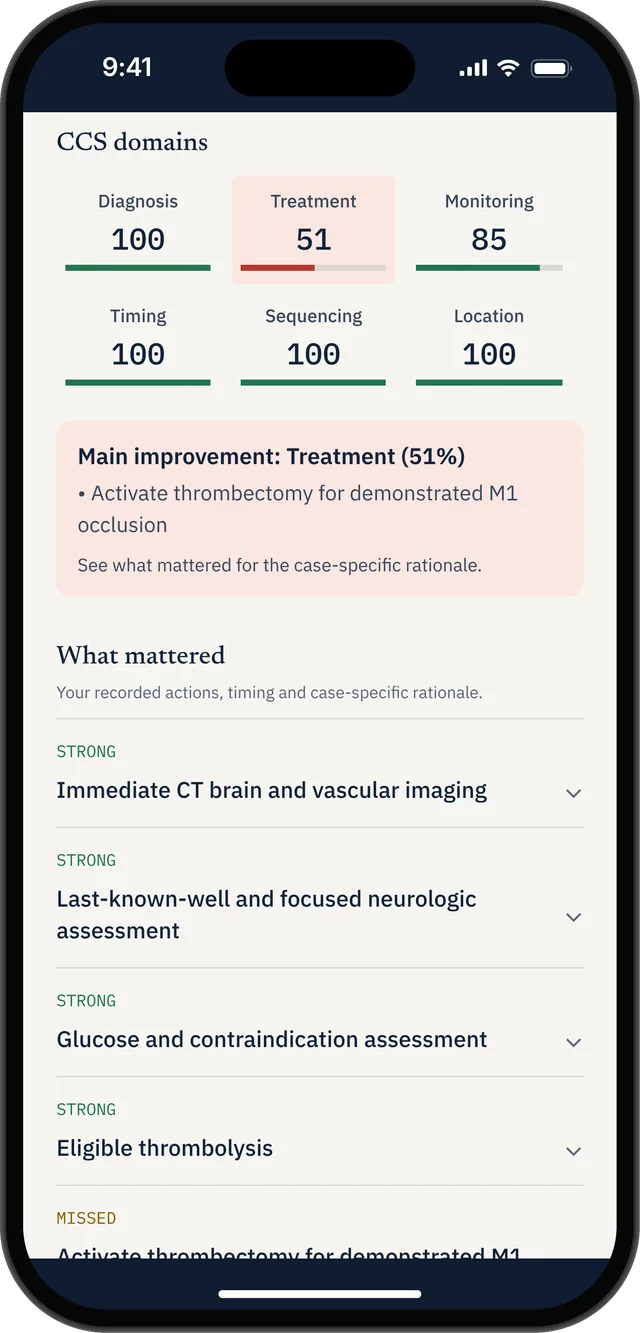
The six-domain breakdown highlights a specific treatment gap so the learner can inspect its explanation.
What to ignore in any comparison
Case counts, past a point. The difference between 90 and 180 cases matters less than whether you will complete 40 of either. Volume you do not use is not an advantage.
Score predictions. The USMLE's CCS scoring methodology is proprietary and unpublished. Any product's score — ours included — is that product's own training metric. It is useful for tracking your trend and finding weak domains. It is not a prediction of your Step 3 result, and a product implying otherwise is worth less trust, not more.
Claims of exam replication. No third-party product has real exam cases. "Exam-style" is an honest description. "Real exam cases" is not.
A commercial refund guarantee is a contract, not a promise that any individual will pass. Read its eligibility requirements before relying on it.
The useful questions are narrower: does this resource fit the time I actually have, does its feedback tell me what to change, and can I try it before I pay for it.
FAQ
Is UWorld's CCS enough on its own?
UWorld includes 90+ CCS cases in its broader Step 3 bundle. If you mainly need CCS practice, compare that bundle cost with Orbit’s 120+ case library and one-time US$34.99 Exam Pass or US$59.99 lifetime access.
Does CCSCases really have more cases than UWorld?
CCSCases advertises 180+ cases and UWorld describes over 90, so on advertised counts yes. Case counts are self-reported by each provider and are not directly comparable in depth or construction, so treat the gap as a rough signal rather than a precise measure.
Can I use a phone app instead of a desktop CCS simulator?
A phone is excellent for frequency, repetition and reviewing your own errors — which is where most candidates' practice actually breaks down. It is not a substitute for rehearsing the exam's own interface, so the practical answer is to use a mobile app for consistency and the official practice cases for mechanics.
How much should I expect to spend on CCS practice?
It ranges from nothing to several hundred dollars. The official practice cases are free, dedicated simulators sell in fixed subscription windows, mobile apps typically offer a free tier plus a paid upgrade, and bundled question bank packages including CCS started at $449 for 90 days at the time of writing. Most candidates do not need more than one paid case bank.
What actually improves a CCS performance the most?
Two things, consistently: fluency with the software so that real time goes to thinking rather than to hunting for orders, and a repeatable workflow — a fixed opening set, a treat-advance-reassess loop, a running disposition question, and a closing sweep. Both are built by repetition rather than by reading, which is why how often you practice tends to matter more than which product you chose.
Keep reading
For a focused price and feature comparison, read CCS Orbit vs CCSCases.
Sources
- UWorld USMLE Step 3 — CCS case counts, free-text order entry, app availability and package pricing.
- CCSCases.com and its purchase page — advertised case count, supported devices, interactive grading, subscription windows and refund terms.
- USMLE, Common Questions: Step 3 CCS — six official practice cases with case-related feedback.
- USMLE, Computer-based Case Simulations — official case mechanics and sample cases.
Third-party details were accurate at the time of writing and change frequently. Verify current features and pricing with each provider.