Start with a patient
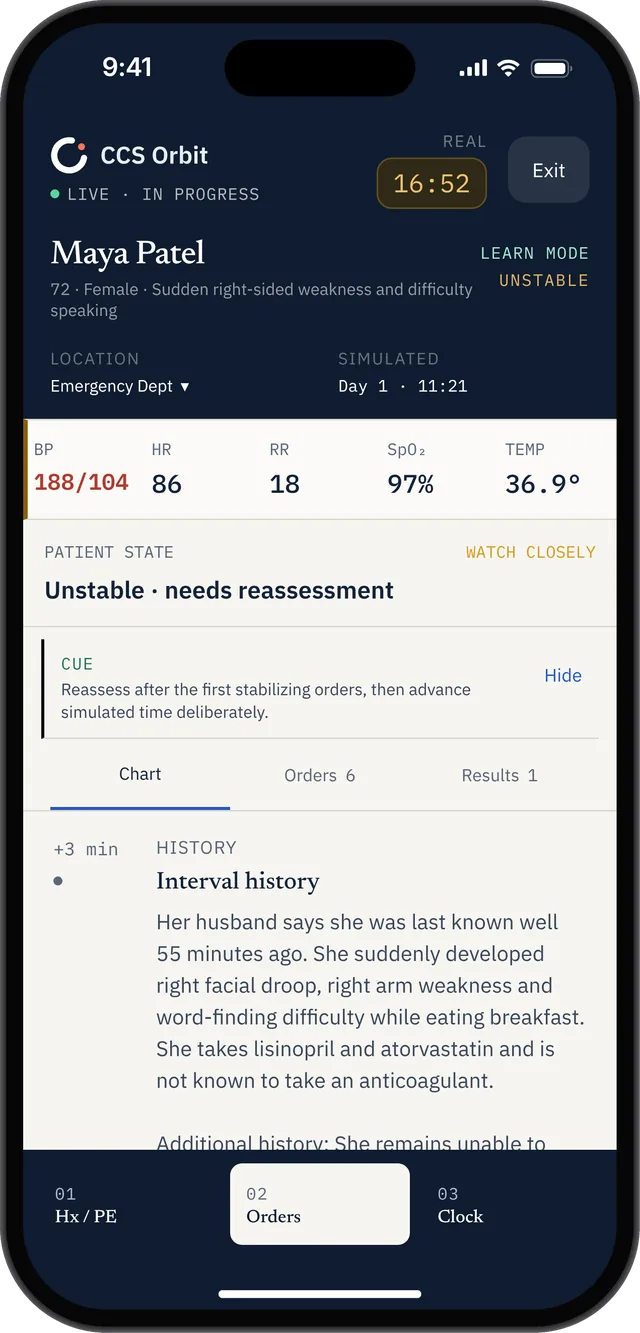
Read the presentation and build your initial plan. Learn mode adds guidance and trap warnings; Exam mode removes in-case teaching cues.
 CCS Orbit
Notify me at launch
CCS Orbit
Notify me at launch
USMLE STEP 3 · DESIGNED FOR IPHONE
Manage a patient, follow the response and learn from your decisions. CCS Orbit brings USMLE Step 3 CCS case practice to iPhone—with cases and debriefs that work offline.
Notify me at launchAvailable on the App Store soon.
A CASE THAT FITS INTO YOUR DAY
Use a quiet break, a train journey or time between study sessions to work through a CCS case. Enter orders, choose a care location, advance simulated time and respond as the patient changes. You practice the management decisions, not just recall a diagnosis.
Read the presentation and build your initial plan. Learn mode adds guidance and trap warnings; Exam mode removes in-case teaching cues.
Review results, reassess the patient and decide what needs to happen next. The real-time case timer and simulated patient clock are separate.
Review what you completed, missed or delayed. Use the debrief to choose one decision to improve in your next attempt.
OPEN THE APP. KNOW WHERE TO START.
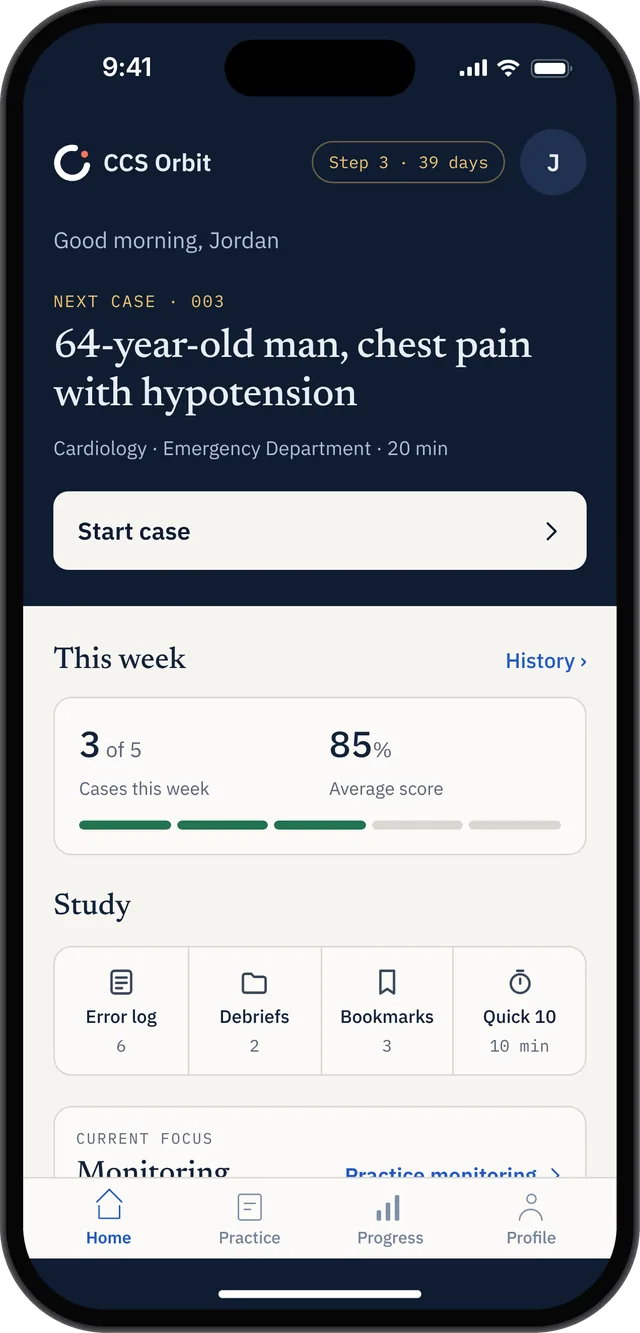
Your next case, weekly practice and study tools sit together on Home. Start a case when you have a clear window, or return to your debriefs when you want to review a previous attempt.
The case preview shows the presentation, clinical area, setting and case length. That helps you choose a session that fits the time you have, while your weekly target gives your preparation a manageable rhythm.
Bookmarks keep cases you want to revisit close by. The Error Log and debrief shortcuts give you a useful place to start when you want to work on an earlier mistake.
The screen shows an example study profile. Your progress reflects your own completed attempts.
MAKE THE TIME YOU HAVE USEFUL
You do not need to use every study session in the same way. Match the task to your available time and leave room to reflect on the result.
Open a previous debrief. Pick a missed or delayed action, read its explanation and decide what you would do differently. You can work on one learning point without starting a fresh case.
Choose a 10-minute or 20-minute case and work through the patient’s course. Allow extra time afterward for the debrief; the case timer does not include your review.
Complete a case, identify the main gap and choose a follow-up case or targeted repeat. Look for a better decision or sequence in the next attempt, rather than chasing a perfect percentage.
These are suggested study routines, not required schedules or guaranteed completion times.
OFFLINE CCS PRACTICE
Once the app is installed and you have access to your cases, cases and debriefs work offline. You can manage the patient and review your feedback without keeping a browser session connected.
Download the app and set up any paid access while you are online before you head out.
Downloading or updating the app, purchasing or restoring Orbit Plus, and sending feedback require a connection.
No CCS Orbit account is required. Purchases use your Apple Account.
PRACTICE AROUND REAL LIFE
CCS Orbit includes 10-minute and 20-minute cases. If you need to stop, choose Save & exit to preserve the patient state, orders and remaining time. Resume the saved case from Home when you are ready.
A shorter window can still be useful: revisit a completed debrief and identify one missed or late decision. Leave time for uninterrupted Exam mode practice as your exam approaches.
Build a two-week CCS practice plan →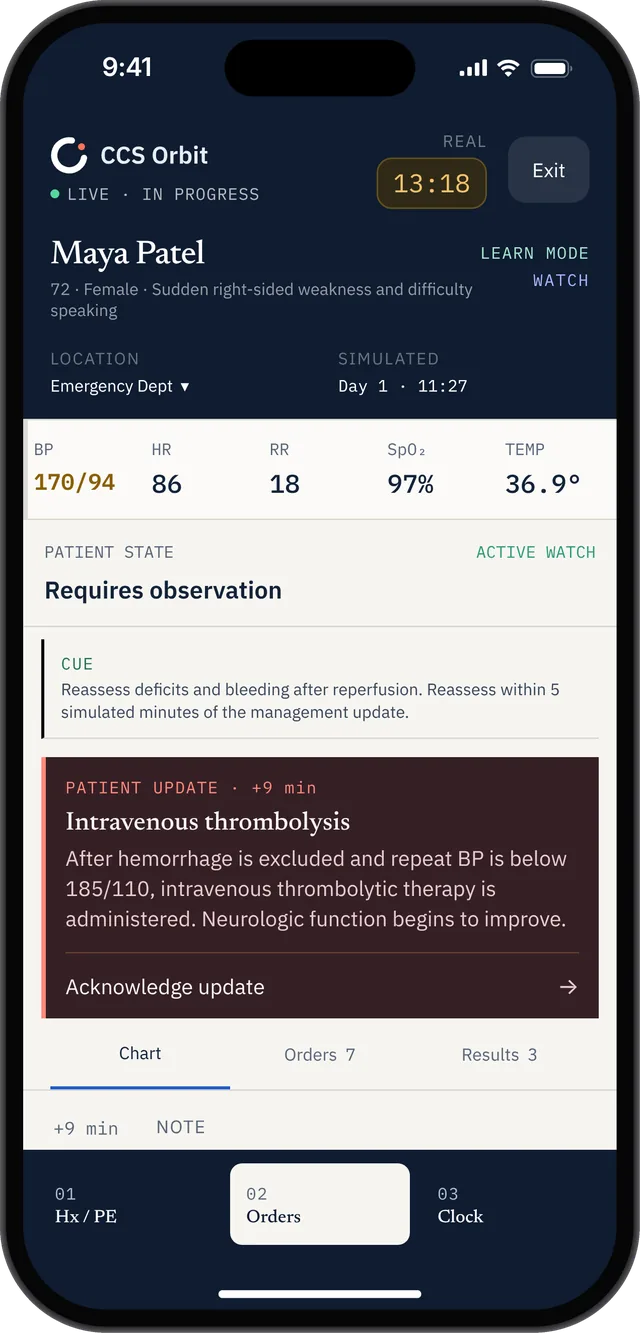
CHOOSE HOW MUCH GUIDANCE YOU WANT
Use guidance and real-time trap warnings while you build your approach. A cue can prompt you to reassess or notice a management issue while the case is still in progress.
Useful when you are learning the app, working through an unfamiliar presentation or revisiting a recurring mistake.
Work through the case without in-case teaching cues. Make your own decisions about orders, timing and reassessment, then examine the feedback after the attempt.
Useful when you want to check which habits you can carry into an uninterrupted practice session.
Both modes keep the patient-management task central: interpret the information, act, review the response and decide what comes next. The choice is how much help you receive along the way.
MORE FROM EACH ATTEMPT
A correct diagnosis is only part of managing a case. Your debrief breaks feedback into diagnosis, treatment, monitoring, timing, sequencing and location, with explanations linked to your actions.
Across attempts, the Decision Profile helps you identify weaker domains. The Error Log surfaces recurring mistakes, and Focus Mode helps you choose cases that target what needs work.
Orbit uses physician-reviewed training criteria. Its scores do not predict official USMLE results.
Understand CCS scoring and practice feedback →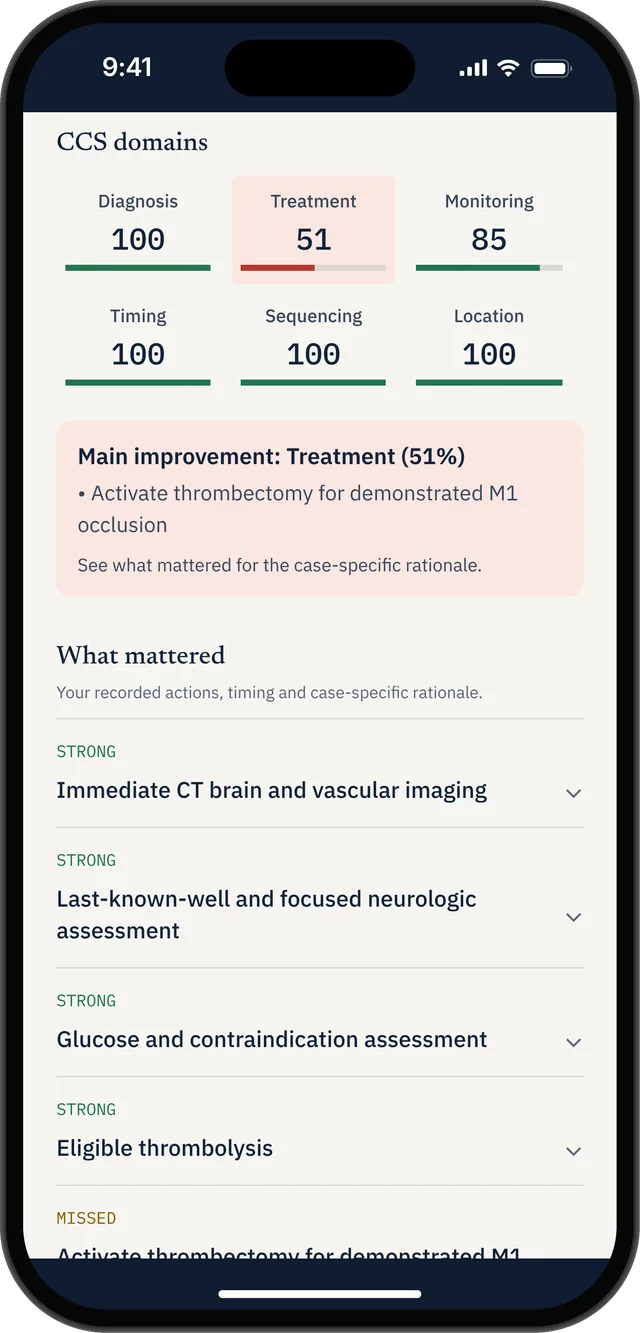
INSIDE AN ACTUAL APP DEBRIEF
These screens show a sample stroke practice attempt. The overall result is 82/100, but the treatment domain is 51%. That contrast gives the learner a more specific question to investigate: which important treatment decisions were missed?
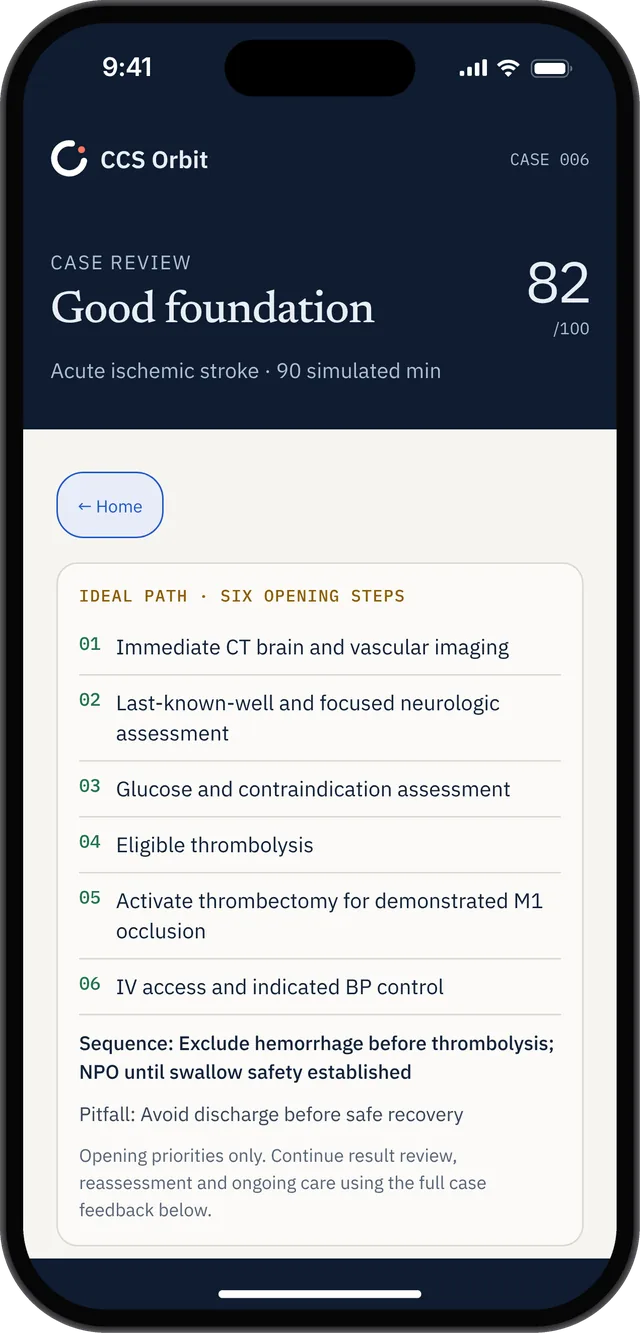
The ideal path summarizes six opening priorities, with a sequencing reminder and a case-specific pitfall. Use it to compare the start of your attempt with the approach described in the feedback.
It is an opening framework. Continue into the detailed debrief to review the rest of the case.
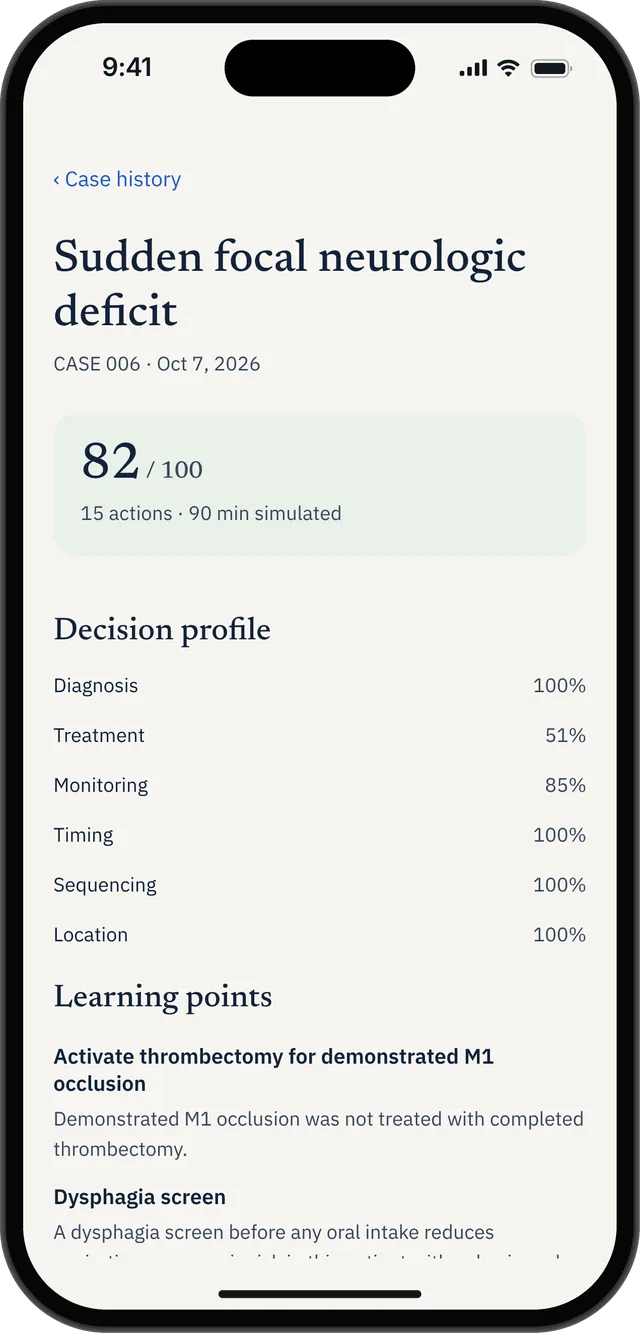
Case history preserves the attempt’s result and learning points so you can review them later. In this example, the feedback identifies specific omissions despite a strong diagnosis score.
Before your next related case, revisit the explanation and choose one change to your approach. Afterward, check whether you made that decision at the right point.
Screens show one sample attempt, not a predicted exam result. Case-specific feedback should be read in the context of the full scenario.
TURN FEEDBACK INTO A PRACTICE PLAN
Look across completed attempts to see which management domains need attention. Use the pattern as a starting point, then inspect individual debriefs to understand the decisions behind it.
Find recurring mistakes across your attempts. Filter by issue type and sort by frequency, recency or domain to choose a useful starting point for review.
Start with your weakest domain or select a different focus, then browse relevant cases. Turn a broad aim such as “improve monitoring” into a concrete choice for your next practice session.
A practical routine: identify a pattern, review one example, choose a case that targets it, and check the next debrief for improvement. Your case history helps connect those sessions.
Orbit is designed for mobile learning. It does not reproduce the official exam interface or scoring algorithm. Alongside your app practice, use the official USMLE Step 3 practice materials to become familiar with the software you will use on test day.
FREE TO START AT LAUNCH
Try three interactive cases and their full debriefs before choosing Orbit Plus. No account or card is required for the free cases.
US$34.99
60 days of full access.
One payment. No automatic renewal.
US$59.99
Full access with no expiry.
One payment. No automatic renewal.
Both plans unlock 120+ cases, Learn and Exam modes, debriefs, Decision Profile, Error Log and Focus Mode.
Only two paid options. No monthly subscription or automatic renewal. Regional prices and applicable taxes appear in the App Store purchase sheet.
Get the launch emailBEFORE YOU START
CCS Orbit is an iPhone-first CCS practice app with 120+ cases at launch. Place orders, advance simulated time, reassess patients and review your decisions. It is coming soon to the App Store.
Cases and debriefs work offline once the app is installed and you have access to the cases. Downloading or updating the app, purchasing or restoring Orbit Plus, and sending feedback require an internet connection.
Yes. Choose Save & exit to preserve the patient state, orders and remaining time. Resume the saved case from Home.
Three cases and their full debriefs are free at launch, with no CCS Orbit account or card required. Orbit Plus unlocks the full library.
Three cases are free. Orbit Plus offers a 60-day Exam Pass for US$34.99 or lifetime access for US$59.99. These are the only two paid options. Both are one-time purchases with no automatic renewal or monthly subscription. Regional prices and applicable taxes appear in the App Store purchase sheet.
CCS Orbit is designed for iPhone. An Android version is not currently offered.
Use the official USMLE Step 3 practice materials as well. Orbit is designed for mobile learning and does not reproduce the official exam interface or proprietary scoring algorithm.