
USMLE Step 3 CCS Software in 2026: What Changed and How to Prepare
Learn what changed in the 2026 USMLE Step 3 software, what stayed the same for CCS cases, and how to prepare for the current exam interface.
If you have been preparing with an older Step 3 tutorial, you may notice that the current exam software looks different.
The USMLE introduced updated test-delivery software for Step 3 on March 10, 2026. The redesign changed the interface and reorganized the multiple-choice portion of the exam into shorter blocks. However, it did not replace the Computer-based Case Simulation format or change the published number and duration of CCS cases.
That distinction matters. You do not need to relearn the medicine or abandon your existing CCS strategy, but you should practice with the current software before exam day.
Here is what changed, what stayed the same and how to adjust your preparation.
What changed in the 2026 Step 3 software?
The update applies to all Step 3 examinations administered since March 10, 2026.
According to the USMLE, the current software includes:
- An updated visual design
- Improved keyboard navigation
- A new settings menu
- The ability to adjust the contrast of images
- More multiple-choice blocks of shorter duration
The overall number of multiple-choice questions and the total length of each examination day remain unchanged. The questions are simply divided differently.
| Exam section | Previous structure | Current structure |
|---|---|---|
| Day 1 multiple-choice questions | 6 blocks of 60 minutes | 12 blocks of 30 minutes |
| Day 1 questions per block | 38–39 | 18–20 |
| Day 2 multiple-choice questions | 6 blocks of 45 minutes | 9 blocks of 30 minutes |
| Day 2 questions per block | 30 | 20 |
| CCS cases | 13–14 | 13–14 |
| Maximum time per CCS case | 10 or 20 minutes | 10 or 20 minutes |
Source: Official USMLE test-delivery software update
The current format therefore gives you more frequent transitions between MCQ blocks, but the published CCS case count and time limits are unchanged.
Did the Step 3 CCS format change?
Not in the ways that matter most for your CCS preparation.
The current Step 3 exam still includes 13–14 Computer-based Case Simulations on Day 2. Each case has a maximum of either 10 or 20 minutes of real time. The CCS section continues to test how you diagnose, treat and monitor a patient as their condition develops over simulated time. Review the current Step 3 exam format.
The USMLE has not announced:
- A different number of CCS cases
- New CCS case durations
- A replacement for the interactive patient-management format
- A new publicly disclosed CCS scoring formula
You will still need to interpret the presentation, enter appropriate orders, manage the patient in the correct setting, advance simulated time and respond to new results or changes in their condition.
So, while the surrounding software feels newer, the central challenge remains familiar: making appropriate clinical decisions in the right sequence without losing control of the clock.
What does the updated interface mean for your preparation?
The visual changes should not fundamentally alter your study plan. They do make one part of preparation more important, though: familiarity.
CCS is not a conventional question bank. You are managing a simulated patient through software, and that introduces a second layer of difficulty. Even when you recognize the diagnosis, you still need to know how to translate your plan into the interface.
That includes knowing how to:
- Request a physical examination
- Enter and review orders
- Advance simulated time
- Review newly available results
- Reassess the patient
- Change the location of care
- Arrange ongoing management and follow-up
The USMLE specifically recommends practicing with its CCS software before the examination. It also warns that candidates who are unfamiliar with the format and mechanics may be disadvantaged under standardized testing conditions. Read the official CCS preparation guidance.
In other words, knowing what you want to do is not quite enough. You need to be comfortable doing it inside a timed simulation.
Real time and simulated time are still different
One of the most confusing parts of CCS is that two clocks are effectively operating at once.
Real time is the time you have at the computer to complete the case. Depending on the case, the maximum is 10 or 20 minutes.
Simulated time represents the time passing for your patient. It may move forward by minutes, hours, days or longer as you request results, schedule follow-up or progress through the clinical course.
These clocks are related, but they are not interchangeable.
You might spend only a few seconds of real time selecting an interval, yet advance the patient’s simulated course by several hours. If the patient is unstable or has a time-sensitive condition, that jump can be clinically significant.
This is why CCS preparation should involve more than memorizing lists of tests and treatments. You also need to practice deciding:
- Which actions must happen immediately
- Which results are necessary before progressing
- How far to advance simulated time
- When to reassess the patient
- When the patient is ready for admission, discharge or follow-up
The current software may look different, but deliberate clock management remains one of the core CCS skills.
How should you prepare for the current CCS interface?
A sensible preparation plan has three parts.
1. Use the official current tutorial
Start with the current interactive testing experience on the USMLE website. This is the authoritative place to familiarize yourself with the interface used for the exam.
Do not rely entirely on screenshots or older walkthrough videos. They may still contain useful clinical advice, but their navigation and layout can be outdated.
The official CCS practice environment is designed primarily for desktop use. USMLE currently recommends Chrome and an optimal resolution of 1920 × 1080, noting that the CCS practice cases are not intended for use on a phone. See the official practice software requirements.
2. Develop one repeatable case structure
You do not want to invent a new workflow every time a case begins. A simple structure reduces hesitation:
- Assess whether the patient is stable.
- Identify any action that cannot safely wait.
- Perform an appropriate focused or complete examination.
- Enter the initial diagnostic and treatment orders.
- Advance simulated time deliberately.
- Review results and reassess the patient.
- Escalate, admit, discharge or arrange follow-up as appropriate.
- Complete relevant ongoing care, counseling and preventive measures.
This is a preparation framework, not a universal order set. The exact sequence must still respond to the patient in front of you. An unstable emergency should not be managed in the same way as a stable outpatient presentation.
3. Practice the decisions, not just the diagnosis
Knowing that a patient has pneumonia, appendicitis or diabetic ketoacidosis is only the beginning of a CCS case.
Your practice should also make you decide:
- What should be ordered first?
- Which treatment should begin before confirmatory results?
- What level of monitoring is appropriate?
- Where should the patient be managed?
- When should time be advanced?
- What evidence shows that treatment is working?
- What needs to happen before the case is safely concluded?
This is where repeated simulation becomes useful. It exposes sequencing problems that are easy to miss when reading a written explanation.
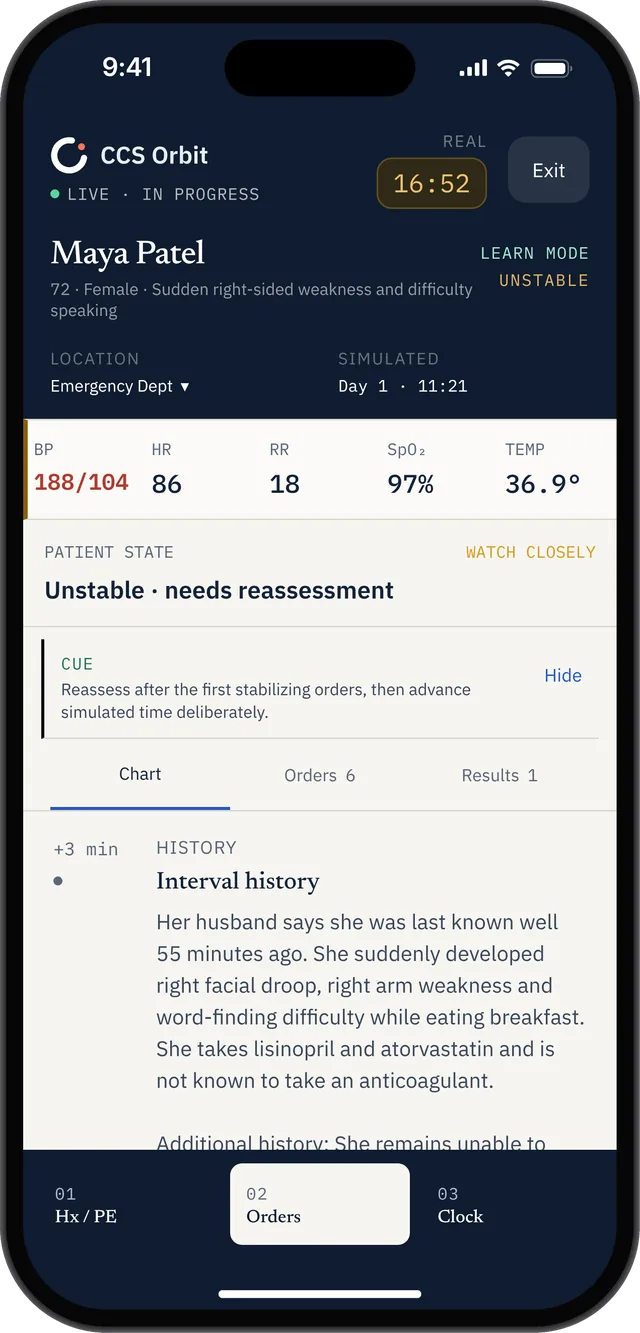
This is CCS Orbit’s mobile practice interface. Use the official USMLE software separately to rehearse the examination controls.
Do older CCS resources still help?
Yes—with one qualification.
The clinical principles behind a well-managed CCS case did not suddenly become obsolete in March 2026. Existing resources can still teach useful approaches to stabilization, investigation, treatment, reassessment and disposition.
However, older resources should not be your only exposure to the software. If a tutorial displays the previous interface, use it for its clinical reasoning rather than assuming every button, screen or navigation step will look the same on exam day.
Before sitting Step 3, complete at least one session using the official current testing experience.
A practical final-week checklist
During the final week before Step 3, make sure you can answer “yes” to the following:
- I have opened and used the current official Step 3 tutorial.
- I understand the difference between real and simulated time.
- I can enter, review and cancel orders without hesitation.
- I know how to request results and reassess the patient.
- I have practiced both 10-minute and 20-minute cases.
- I can recognize when urgent treatment should precede a full workup.
- I can choose an appropriate location of care.
- I remember ongoing treatment, counseling and follow-up when relevant.
- I have a consistent approach to the final phase of a case.
- I can manage the interface without letting it distract from the clinical problem.
If several of these still feel uncertain, targeted case practice is likely to be more useful than simply reading another list of “high-yield orders.”
Practice Step 3 CCS from your iPhone
Frequently asked questions
When did the Step 3 software change?
The updated test-delivery software was introduced for Step 3 examinations beginning on March 10, 2026. It is now used for all Step 3 exams.
How many CCS cases are on Step 3 in 2026?
The current official format includes 13–14 CCS cases on Day 2.
Are Step 3 CCS cases still 10 or 20 minutes?
Yes. Each case is allotted a maximum of either 10 or 20 minutes of real time.
Did CCS scoring change in 2026?
The USMLE has not announced a new CCS scoring system as part of the software update. Be cautious with resources claiming to know an exact scoring formula, because detailed case-level scoring rules are not publicly released.
Should I still use older CCS videos and guides?
They can still help with clinical reasoning and case strategy. However, you should also use the official current tutorial so that your expectations about the interface are up to date.
Is practicing the interface really necessary?
Yes. The USMLE advises candidates to practice with the CCS software and states that unfamiliarity with the format and mechanics may place examinees at a disadvantage.
Official sources
USMLE: Test Delivery Software Updates Coming in 2026